On Hopping Claudes
Dave Rolsky recently wrote about how he vibe-coded some apps. One of the neat things about today’s tools is that we can write tools to scratch personal itches with a lot less effort and friction. I’ve written a macOS menu bar timer, a custom Triathlon training plan generator (with a static website and an iCal subscription), added a lot of functionality to My Mind is Racing and, most recently, I’ve vibe coded yet another Claude Code agent dashboard.
I could have used someone else’s app but:
- I wanted something that does EXACTLY what I want
- It has to work with my very specific way of using
git worktreeandtmux - There’s so much vibe coded stuff out there from people that I don’t know and don’t yet trust. I don’t want to introduce a new supply chain risk into my dev stack
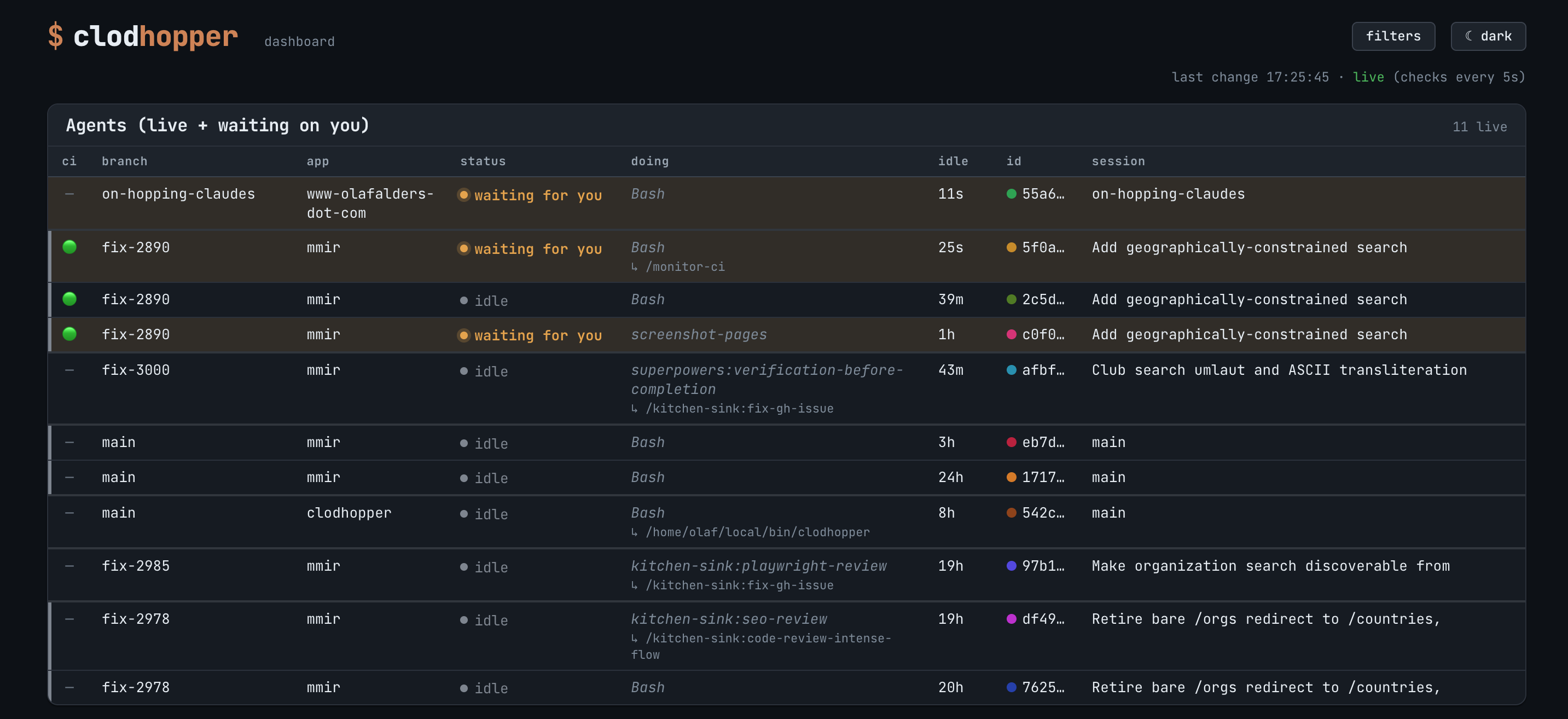
I asked Claude to do a bit of research and, after finding disler/claude-code-hooks-multi-agent-observability it used that as inspiration. The first 80% was quick, but there’s a lot of faffing about after that to get exactly what I want, because the LLM does not yet read my mind. I’ve been messing around with Claude Design, so after shipping the app, I decided we could make it prettier. Now I have my dashboard. I serve it on my Tailscale network, so that I can check on my agents using my phone without having to resort to a terminal. That keeps it available to me, but also private.
This allows me to track where something is in CI, whether something is stalled, idle, or needs my feedback and what is ready for UAT or merge. My older flow was flipping through A LOT OF TMUX SESSIONS to try to figure out where everything was. No joy there. This is nicer for me.
I’ve made the repo public as there’s no reason to keep it private, but I’ve only added the things that I need, because I’m the only user. Maybe your LLM can draw some inspiration when you write your own dashboard.
Note that this blog post appears in the dashboard output. I don’t use LLMs to write my posts, but I do use them for scaffolding, proofreading, etc.
Quick start:
# 0. Install ubi (the Universal Binary Installer) if you don't already have it.
curl --silent --location https://raw.githubusercontent.com/houseabsolute/ubi/master/bootstrap/bootstrap-ubi.sh | TARGET=~/local/bin sh

# 1. Install the binary (see Install for manual download / build-from-source).
ubi --project oalders/clodhopper --in ~/local/bin

# 2. From a project's root, wire the capture hooks into its Claude Code settings.
cd /path/to/your/project

# set up hooks in .claude/settings.json or .claude/settings.local.json (idempotent)
clodhopper init

# 3. Use Claude Code in that project as normal — events start flowing immediately.

# 4. When you want to look, start the dashboard:
clodhopper serve                 # http://127.0.0.1:4555
See also: